
Thunder VPN - Fast, Safe VPN
Secure Signal Inc.Tools
4.866.13K Reviews
- Version
- 5.4.4
- Installs
- 100.00M
- Age Rating
- Everyone
Screenshots

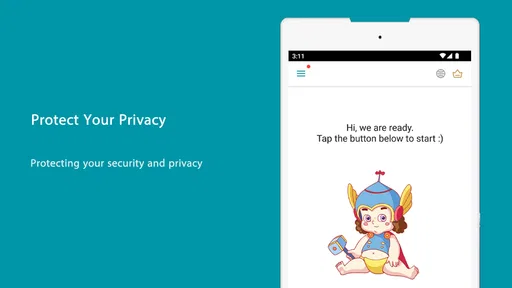
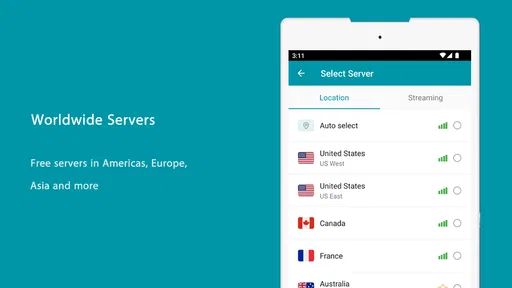
Our Review of Thunder VPN - Fast, Safe VPN
 Analysis by Appyee
The best way to judge a VPN is not by a bold promise but by what happens when your phone’s connection changes. A page may load quickly on home Wi-Fi, then stall on a crowded public network or while you move between places. I look at Thunder VPN as a simple connection tool for those ordinary moments: useful when you want a quick VPN connection without learning a pile of settings, but less suited to anyone who needs detailed control or wants a clearly explained technical setup.
When a quick connection helps
Thunder VPN is a free tools app from Secure Signal Inc. Its straightforward approach is the main appeal: you can open it, connect, and get back to what you were doing rather than spend time tuning a long list of options. That can be handy when you want to use a VPN for a short browsing session, or when you are helping a less technical family member get started. The app is rated for Everyone, so its store age classification is broad, though that alone should not be taken as a guarantee about what every person should do online.
There is a practical trade-off in keeping the controls simple. A newcomer may appreciate not having to choose protocols or interpret technical labels, while a more experienced user may want to know exactly how a connection is configured and what privacy protections apply. I would treat ease of use as a genuine strength, not as proof that the app is the right choice for every sensitive task. If your priority is a detailed privacy audit or fine-grained network control, compare it with a VPN that explains those areas more fully before relying on it.
Using it across everyday mobile networks
A VPN depends on an internet connection to do its job, so a weak or interrupted mobile signal can affect the experience even when the app itself is simple. I would connect before starting something that is awkward to interrupt, such as a long web form or a file transfer, and avoid assuming that a VPN will make poor reception better. It changes how your traffic is routed; it cannot create a stronger signal where your phone has none.
On a commute, for example, you might be reading the news on Wi-Fi at a station and then switch to mobile data as you board. That handoff can interrupt a VPN session or make a page reload. My practical habit would be to check that the connection is active again before entering account details or continuing a task that matters. If an app stops responding after the network changes, first check the phone’s internet connection, then reconnect the VPN and retry the page. This separates a weak network from a VPN connection that needs to be restarted.
Speed, privacy, and the limits of a quick test
The listing describes Thunder VPN as a fast VPN, but speed is never a fixed quality that every user will experience in the same way. It can vary with signal strength, the network you are using, the selected server, and how busy the route is. A nearby server may be a sensible first choice for ordinary browsing; a distant location can add delay, especially for calls, games, or other activities where responsiveness matters. If one connection feels sluggish, I would test another available server before deciding that the app is unusable.
Encryption is part of the app’s stated privacy purpose, but a VPN should not be confused with complete anonymity or protection from every online risk. It does not make a suspicious link safe, prevent every tracking method, or replace careful account security. I would use it as one layer of protection, keep software updated, and avoid sending highly sensitive information through any service whose privacy details I have not reviewed closely. That caution is particularly important if you are choosing a VPN for work, financial activity, or a situation where a specific security standard is required.
Free access, ads, and sensible expectations
The free version includes ads, so the cost of trying it is not simply money: interruptions and attention are part of the bargain. If you only need occasional VPN access, that may be an acceptable exchange. If you expect to keep the app open frequently, repeated advertising can become a reason to look elsewhere or consider the paid option. In-app purchases are listed from $1.99 to $59.99 per item, so I would check the purchase details in the app and decide whether the terms suit your needs before paying.
Thunder VPN has an average rating of 4.8 from around 1.8 million ratings, and it has been installed over 100 million times. Those figures suggest that many people have tried it, but popularity cannot tell you whether a particular VPN meets your privacy requirements or behaves well on your network. The app was released on November 3, 2017, and version 5.4.1 is listed for devices running Android 6.0 or later. I would check that your device meets the requirement and that the version available to you is current before troubleshooting connection problems.
Getting Started with Thunder VPN
First things first, let’s talk about setting up Thunder VPN. The app is available for both Android and iOS, and the download process is pretty straightforward. Just head over to the Google Play Store or the Apple App Store, search for Thunder VPN, and you’re good to go.
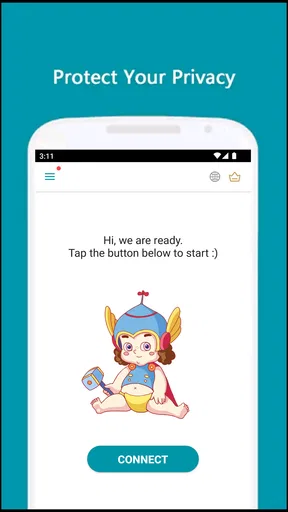
Once you’ve got it installed, the interface is refreshingly simple. No complicated menus or overwhelming options. Just a big button that says “Connect,” and you’re on your way. Seriously, if you can order a coffee from an app, you can handle Thunder VPN.
Features That Stand Out
One of the standout features is its speed. I’ve tried a bunch of VPNs that claim to be fast, but Thunder VPN genuinely delivers. Whether you’re streaming videos, browsing the web, or playing games, the connection remains stable and quick. It feels like there’s no noticeable difference in speed between being connected and disconnected, which is a big win.
Security-wise, Thunder VPN uses encryption to keep your data safe. While it doesn’t advertise the specifics of its encryption standards (which some users might find a bit vague), it does promise privacy and protection. During my testing, there were no leaks, and my IP address remained hidden as advertised.
User Experience and Interface
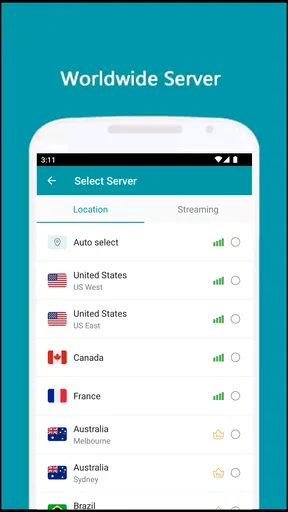
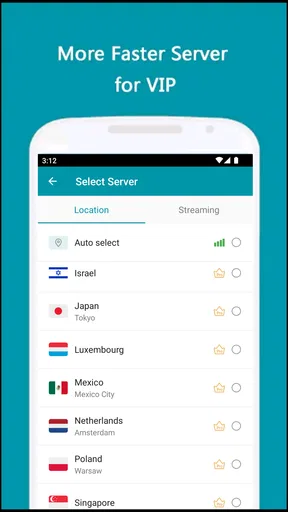
The user interface is minimalist, which I love. Sometimes less is more, and Thunder VPN seems to get that. You can choose from a list of servers in various countries, and switching servers is just a tap away. There’s no need to dig through settings or deal with complicated configurations. This makes it perfect for VPN beginners or those who just want something that works without fuss.
Another thing worth mentioning is that the app is free to use, with ads. The ads aren’t overly intrusive, but if you’re someone who despises them, it might be a bit annoying. There is an option to purchase a premium version to remove ads, which might be worth considering if you plan to use the app regularly.
Performance During Daily Use
During my daily use, I found Thunder VPN to be quite reliable. Whether I was catching up on shows on Netflix or just browsing the internet, the connection stayed stable. There were a couple of instances where the connection dropped, but reconnecting was as simple as hitting the “Connect” button again. It’s a minor inconvenience but not a dealbreaker for me.
“Thunder VPN is like a trusty old friend – always there when you need it and doesn’t ask for much in return.”
Final Thoughts on Thunder VPN
Overall, Thunder VPN is a solid choice if you’re looking for a straightforward VPN solution. It’s fast, easy to use, and gets the job done without any unnecessary bells and whistles. While it may not be the most feature-rich VPN on the market, its simplicity and performance make it an appealing option for many users.
If your primary needs are speed and ease of use, Thunder VPN is definitely worth a shot. Just be aware of the ads in the free version, and consider upgrading to premium if they start to bug you. Happy surfing, and here’s to safer and faster internet adventures!
Choosing it for the right kind of task
I would put this app on the shortlist for someone who wants an uncomplicated way to start a VPN session while browsing on a phone, especially if they do not want to study settings first. A realistic example is checking a travel itinerary or reading messages while waiting at a café: connect before opening the task, keep an eye on whether the session stays active, and reconnect if your phone changes networks. That is a more useful expectation than treating the VPN as something that silently fixes every network problem.
For a different kind of user, the better choice may be a paid VPN built around transparent technical documentation, configurable security options, or a specific work requirement. Those priorities matter more than a quick connect button when you need to assess precisely how a service handles traffic. I would also skip Thunder VPN if advertising is a dealbreaker, if you need dependable performance for latency-sensitive work, or if you cannot accept uncertainty about the details of a VPN’s privacy practices.
Small habits that make mobile use smoother
One useful habit is to test a server before you begin a time-sensitive activity. Open a low-stakes page first, then continue once it loads normally; if it is slow, try another server rather than repeatedly refreshing the same page. This avoids wasting time on a route that is not working well at that moment. When you are switching from Wi-Fi to mobile data, pause briefly and confirm the VPN is still connected instead of assuming the app followed the network change without interruption.
It is also worth separating the VPN’s job from the phone’s other connections. A VPN can affect access to services that depend on your apparent location or network route, so if a site or app behaves unexpectedly, disconnecting temporarily can help identify whether the VPN is involved. I would do that only when the network is trusted and the task does not call for VPN protection. The point is to troubleshoot deliberately, not to leave the VPN off by habit.
What to expect when a session fails
If a page hangs, I would avoid tapping Connect repeatedly in quick succession. First check whether ordinary internet access works without the VPN, then reconnect once and give the page another try. If it still fails, changing servers is a reasonable next step. This simple sequence helps distinguish a general signal problem from a route-specific issue and prevents a frustrating cycle of repeated attempts.
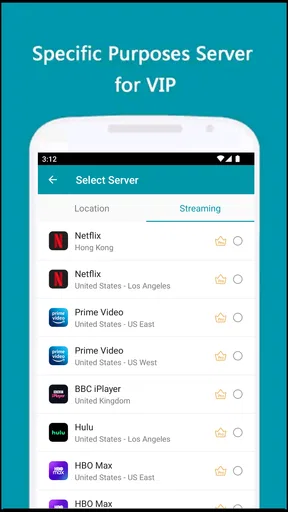
For streaming, the experience can depend on the service and the chosen route, so I would not assume that every catalog or video will work just because the VPN connects. A VPN connection is not a guarantee of access to a particular platform, and a longer-distance route can add delay or reduce smoothness. For casual viewing, it may be worth testing at a convenient time; for a live event or a call you cannot miss, a familiar direct connection or a more configurable service may be the safer choice.
Where simplicity is a real advantage—and where it is not
Compared with more elaborate VPN apps, Thunder VPN’s minimal interface reduces the number of decisions between opening the app and connecting. That is helpful when the goal is simply to get started. The trade-off is that fewer visible controls can mean less ability to tailor a session or understand why one server behaves differently from another. I see that as a fit question rather than a flaw for everyone: beginners may value less friction, while users who like to inspect settings may prefer an alternative with more explanation and control.
Before paying to remove ads, I would first use the free version enough to learn whether the connection suits the networks and tasks I actually rely on. The purchase range is broad, so read the in-app terms carefully rather than assuming every option has the same duration or benefits. If the ads are only an occasional nuisance, staying free may make sense; if they interrupt frequent use, compare the paid choice with other VPN services on both cost and privacy transparency.
A grounded connectivity verdict
What makes Thunder VPN appealing is not that it can overcome every weak signal or guarantee flawless access, but that its basic flow is easy to understand. For everyday browsing on a phone, that low learning curve can be enough. I would still build in a quick connection check before important tasks, especially after moving between networks, and keep a backup plan for anything that cannot be interrupted.
My recommendation is therefore conditional: try it if you want a free, uncomplicated VPN and are comfortable judging its performance on your own device, while remembering that ads and limited visible detail may not suit everyone. If privacy documentation, advanced controls, or predictable performance for demanding work are central to your decision, compare services on those points first. The right VPN is the one whose behavior and level of explanation match the risks and routines you actually have.
Verdict
Strengths of Thunder VPN - Fast, Safe VPN
- Fast connection speeds for streaming.
- User-friendly interface for easy use.
- No registration required for access.
- Works well with public Wi-Fi networks.
- Unlimited bandwidth for browsing.
Limitations of Thunder VPN - Fast, Safe VPN
- Limited server locations available.
- Ads can be intrusive during use.
- No option for manual server selection.
- Doesn't support advanced security features.
- Free version lacks premium features.
Other Releases by Secure Signal Inc.
View All
Secure VPN-Safer Internet
Tools4.7
Similar Picks in This Category
View All
Google LLC4.0

Gboard - the Google Keyboard
Google LLC4.5

Google Play services
Google LLC4.3

Google Play Store
Google LLC4.9

Files by Google
Google LLC4.5

SHAREit: Transfer, Share Files
Smart Media4U Technology Pte.Ltd.4.3
Frequently Asked Questions
What features does Thunder VPN offer?
Thunder VPN provides users with a fast, secure, and reliable VPN service. It offers unlimited bandwidth, a simple user interface, and no registration requirements. With servers in multiple countries, it ensures a stable connection while protecting your privacy online by masking your IP address and encrypting your internet traffic.
Is Thunder VPN free to use?
Yes, Thunder VPN is free to use with ads. Users can access all basic features without any cost. However, there might be optional in-app purchases for an ad-free experience or access to additional server locations. This makes it accessible for those looking for a cost-effective VPN solution.
How does Thunder VPN protect my privacy?
Thunder VPN uses encryption technology to secure your internet connection. By routing your traffic through an encrypted tunnel, it masks your IP address and prevents third parties from tracking your online activities. It also claims to have a no-log policy, meaning it doesn’t store your browsing data, enhancing privacy.
Is Thunder VPN compatible with my device?
Thunder VPN is available for both Android and iOS devices. It requires Android 5.0 or later and iOS 11.0 or later. It is designed to be lightweight and easy to use, ensuring it runs smoothly on most smartphones and tablets without consuming significant resources.
Can Thunder VPN bypass geo-restrictions?
Yes, Thunder VPN can help bypass geo-restrictions, allowing you to access content that might be restricted in your region. By connecting to servers in different countries, you can appear as if you're browsing from a different location, thus accessing blocked websites or streaming services.
